Broadcom NIC Teaming and Hyper-V on Server 2008 R2
The short of this is if you’re trying to use NIC teaming for the virtual adapter on Server 2008 R2 save yourself the headache, pony up a few extra dollars and buy Intel NICs. The Broadcoms have a bug in the driver that prevents this from working correctly on Server 2008 R2 Hyper-V when using a team for the Hyper-V virtual switch. Per the Broadcom driver release notes this is supposed to be a supported configured now, but it does not work correctly. There are two scenarios so far where I’ve been able to reproduce the problem:
- VM guest has a static MAC assigned and is running on a VM host. Shut down the VM, assign it a dynamic MAC and start it again on the same host. You’ll find it has no network connectivity.
- VM guest is running on VM Host A with a dynamic MAC. Live Migrate the VM guest to Host B. It has network connectivity at this point, but if you restart the VM on the opposite host you’ll find it receives a new MAC and no longer has network connectivity.
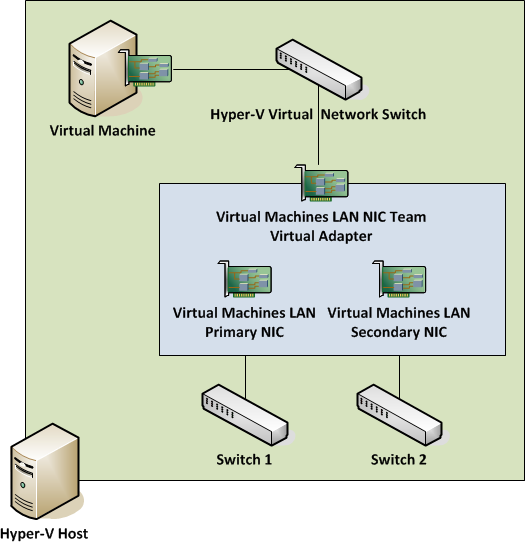
Take a look at this diagram (only showing NICs relevant to Hyper-V) and you’ll see what the setup is that causes the issue. We have 2 Broadcom NICs on Dell R710’s each connected to a different physical switch to protect against a port, NIC, or switch failure. They are teamed in an Active/Passive configuration. No load balancing or link aggregation going on here. The virtual adapter composed of the two team members is then passed through as a virtual switch to Hyper-V and it is not shared with the host operating system. The host itself has a team for its own management and for the Live Migration network, which I’ll point both work flawlessly – the issue here is purely related to Broadcom’s teaming through a Hyper-V virtual switch.
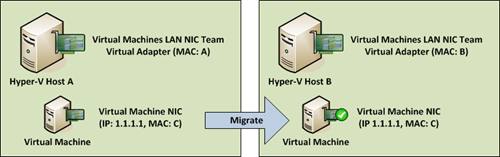
Say I have a VM running on Host A where the NIC team has a hypothetical MAC called MAC A. When it boots up, it receives a dynamic MAC address we’ll call MAC C from Host A’s pool. If you try to ping the VM guest’s IP 1.1.1.1 and then look at your ARP table you’ll see something like:
| Internet Address | Physical Address | Type |
| 1.1.1.1 | MAC A | Dynamic |
This is because the NIC team is responsible for answering requests on behalf of the VM. When the NIC team receives traffic for the VM’s IP it will accept it, and then pass it along to the Hyper-V virtual switch. If you were to take a packet trace off the NIC you’ll see the team has modified the Layer 2 destination address to be MAC C, the dynamic MAC the VM got when it booted. This is how the teaming is supposed to work.
Now say I migrate the VM to Host B (where the NIC team has a MAC called MAC B) via Live or Quick migration. The VM retains connectivity and if you take a look at your MAC table you’ll now see something like:
| Internet Address | Physical Address | Type |
| 1.1.1.1 | MAC B | Dynamic |
Yup, the MAC for Host B’s NIC team is now answering requests for the VM’s IP. Again, this is how the teaming is supposed to work. Everything is peachy and you might think your clustering is working out great, until you restart the VM.
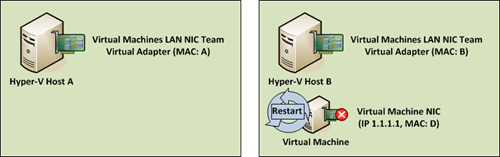
When the VM restarts, upon booting it receives a new dynamic MAC from Host B’s pool and you’ll find it has no network connectivity. Your ARP table hasn’t changed (it shouldn’t, the same team is still responsible for the VM), but the guest has been effectively dropped. When I pulled out a packet trace what I noticed was the team was still receiving traffic for the VM’s IP, which ruled out a switching problem, but it was still modifying the packets and sending them to MAC C. When in fact, now the VM has restarted it has MAC D. The problem is that it seems somebody (the driver) forgot to notice the VM has a new MAC and is sending packets to the wrong destination, so the VM never receives any traffic.
I found that toggling the NIC team within the host actually fixes the problem. If you simply disable the virtual team adapter and then re-enable it the VM will instantly get its connectivity back so it seems that during the startup process the team reads the VM MACs it’s supposed to service. I would think this is something it should be doing constantly to prevent this exact issue, but for now it looks like it’s done only at initialization.
The most practical workaround I’ve found so far is to just set static MAC addresses on the VMs within the Hyper-V settings. If the VM’s MAC never changes, this problem simply doesn’t exist. So while that defeats the purpose of the dynamic MAC pool on a Hyper-V host it allows the teaming failover to operate properly while you restart VMs and move them between cluster nodes.
I’ve raised the issue with Dell/Broadcom and they agree it’s a driver problem. There is supposedly a driver update due mid-March, but no guarantees this will be addressed in that update. The next update isn’t slated until June which is a long time to wait, hence the recommendation to just use Intel NICs.
Other notes for the inquisitive:
- Disabling the team and using only a single adapter makes this work properly.
- Happens with or without all TOE, checksum and RSS features.
- No VLAN tagging in use.
- Issue persists when team members are plugged into the same switch.
- Latest drivers from Dell/Broadcom (12/15/2009) as of this writing.
- Happens whether teaming is configured before or after Hyper-V role is installed.
I have also noticed some Dell servers running Intel and Broadcom NICs together causes something on the Hyper-V host to simply shut off the server. Powers down for no obvious reason. Disabling EITHER NIC results in stable performance. No updating of NIC drivers helps this. Don’t know if this is related or not.
I am having similiar issues, however even with static MAC’s the problem still occurs.
Using Broadcoms latest drivers whenever a team is assigned to the virtual switch, all of the VM’s on that host acquire the MAC of the Team. It gets to the point where I can have 5-10 servers all with the same MAC and a lot of issues with packet loss.
To get around this so far I have set the team to use FEC/GEC LAG even though each NIC in the team is connected to different switches.
Would the option to enable MAC spoofing in HV R2 help with this issue?
http://blogs.technet.com/jhoward/archive/2009/05/21/new-in-hyper-v-windows-server-2008-r2-part-2-mac-spoofing.aspx
http://sbcengine.blogspot.com/2009/10/windows-nlb-on-hyper-v-r2.html
As an update here this ran fine for a few weeks and now we’re seeing that once a VM migrates the other virtual switch is still answering ARP replies for the VM. So what happens is half your pings go one direction and the other half the other way, making for a very unstable guest VM. We’re disabling the teaming for now and I’m personally never, ever, ever buying Broadcom again.
Anthony, the behavior you mentioned is correct – to an outside machine the MAC of all the VMs running on a single host will be the same. That’s just how the Hyper-V virtual switch works with teaming so if you’re having connectivity issues there’s probably something else wrong.
A side note on this BroadCom Teaming. For us failover clusters doing a large amounts of TCP/IP traffic would cause the active node to crash roughly every 4-6hours. MS and Dell solution was to turn off Chimney Offloads. This has fixed this problem. Dell stated they have a engineer call open with BroadCom to resolve the issue. Also BroadCom Teaming on our IBM Blades has also caused a couple of our new 2008 DC’s to ARP out and kill our Cisco 6500’s.
So like stated save a headache and support calls get some Intel NIC’s
As an update here this ran fine for a few weeks and now we’re seeing that once a VM migrates the other virtual switch is still answering ARP replies for the VM. So what happens is half your pings go one direction and the other half the other way, making for a very unstable guest VM. We’re disabling the teaming for now and I’m personally never, ever, ever buying Broadcom again.
Anthony, the behavior you mentioned is correct – to an outside machine the MAC of all the VMs running on a single host will be the same. That’s just how the Hyper-V virtual switch works with teaming so if you’re having connectivity issues there’s probably something else wrong.
It appears that Broadcom may have finally fixed the issue in their BACS teaming software!!!
I have only gotten a chance to do preliminary testing but our configuration is as follows: Fully Patched Windows Server 2008R2 with the latest NIC firmware (from IBM’s site) and NIC Drivers and Broadcom Management Applications Installer (BACS software) from Broadcom’s website. We are running IBM HS21 Blades with Broadcom 5708S NetXtreme II GigE NICs. Our NICs are teamed with No VLANs (testing that next) and in Smart Load Balancing with Failover mode (no standby) with LiveLink not configured. I upgraded the BACS software after first uninstalling the old (and rebooting) and did not bother with installation order of the Hyper-V Role. All Virtual Children have Dynamic MACs.
The testing at this point has been pretty basic. All that I have done so far is basically migrate a Virtual Server Child from one Host to another. However, since this never worked before (exhibiting the mentioned behavior) it seems like things should work now! I am going to continue stress testing (rebooting children on different hosts, rebooting hosts, messing with the NICs in the team to verify connectivity happens on a down path, adding VLANing, etc.) to see if all of their bugs are gone. But as stated, I now no longer have my other Hosts that at any time had that server migrated to it attempting to claim that Child server’s MAC/IP Addressing making pings go every which way.
I just wanted to get this post up in order to see if other people have similar results and to let others know this may be working now!
We have the same problem, if you live migrate a VM from R2 host A to R2 host B the Broadcom team on host A continues to send out spoofed ARP requests to hosts that the VM had TCP sessions opened to at the time of migration.
Whats intresting is that with an Intel team the mac addresses of VM’s are learnt by the switch, with the Broadcom teams the switch does not learn the MAC address of the VM’s as the Broadcom Team over writes the source mac addresses of all packets with the team mac address.
Too bad no one mentions the driver version, that would really be usefull. My broadcom has version 14.1.5. Teaming has broken my network load balancing with virtual machines.
Driver version with the fix would be 14.2.4, A04: “- Several teaming driver, BASP, issues on Windows 2008/2008 R2 fixed. - Added Hyper-V Live Migration features with BASP teaming”
I have the same problem, I recently updated the Broadcom drivers to 5.2.14.0. It still has the same problem
Can anyone else confirm if this is solved or not? I believe the issue is in the basp team driver. If it is working for you, please post the version of the basp driver you are running.
Here is a great walk-though I made up of how we made this work on a ibm 3650 M3 and a HS22 and the rest of our environment. If you want to trunk the port, create one managed vlan and use this for host access. Then create a Broadcom untagged vlan, set it up to allow trunking on all vlans through scvmm and set the tagging on the hyper-v side assigning the untagged vlan to the guest. The mac address no longer stay on the host when it moves and you can change the ip back and fourth with no hitch. We tested this between a few different types and it works. Enjoy.
http://cid-d4bc1bf3c9a3f101.office.live.com/edit.aspx/Hyper-V
@William Lee
When you say “wo physical NICs plugged into different switches that have the ports in trunk mode”
You’re talking about the two port of the NIC team? The two switches are stacked and not connected via a LAG?
We have a HVr2 cluster with Broadcom BCM5709C NICs running v 6.2.9.0 (04/02/11) with BACS v 12.6.13.0 and have experienced no problems yet.
Live migrations running fine, teamed the VM NICs with LACP. Not experienced any of the issues described here. HVr2 servers are HP DL380 G7.
Well, this post is 1.5 years old, so I certainly hope the latest drivers have resolved the issue.
i just set dynamic macs with static ip address, Live migration and failover work perfectly
Although i also still have the virtual teaming issue with intel nics… seems the order still matters with fujitsu servers and quad port nics to Procurve gear. its a real pain