OCS 2007 R2 Front-End Server 2008 Requirements Made Easy
The OCS Resource Kit team, aka DrRez, posted a link on Twitter this morning to a blog post detailing ServerManagerCmd.exe lines you could throw in a batch file to install the prereqs for OCS 2007 R2. That post reminded me of an .XML file I had created awhile back that I had forgotten to share which offers similar functionality.
My file differs a bit from the components John Weber suggested in that it’s a little more restrictive about what IIS components actually get installed. I take the basic IIS install and add only Windows Authentication and the IIS 6 management features. I’ve been using this file for a number of deployments and haven’t run into issues yet with a component being missing so I feel comfortable posting this. There are also two components you’ll see here that are not in John’s post. The first is MSMQ with directory service integration to make sure your QoE agent service doesn’t fail to start all the time. The second is the Telnet client, which I find useful for basic troubleshooting.
If you don’t want either of these, it’s easy enough to edit the .XML file and remove them. You can download the file below. Just right-click and save-as.
Keep in mind this is for a Front-End server only. A role like Communicator Web Access requires different components to be installed.
Rather than using a batch file just save this XML to your server and run the following command to install all your Front-End prerequisites.
Command
ServerManagerCmd.exe –ip OCS2007R2-FE.xml
XML File Download
XML File Contents
<!-- ServerManagerCmd Answer File compatible with Windows Server 2008 -->
<!-- Usage: ServerManagerCmd -ip OCS2007R2-FE.xml -->
<ServerManagerConfiguration Action="Install" xmlns="http://schemas.microsoft.com/sdm/Windows/ServerManager/Configuration/2007/1">
<!-- Install IIS -->
<Role Id="Web-Server"/>
<RoleService Id="Web-Windows-Auth"/>
<RoleService Id="Web-Mgmt-Compat"/>
<!-- Install Message Queuing for Monitoring Server link -->
<Feature Id="MSMQ-Server"/>
<Feature Id="MSMQ-Directory"/>
<!-- Install AD DC Tools -->
<Feature Id="RSAT-ADDC"/>
<!-- Install Windows Process Activation Service -->
<Feature Id="WAS-Process-Model"/>
<Feature Id="WAS-Config-APIs"/>
<!-- Install Telnet client for troubleshooting -->
<Feature Id="Telnet-Client"/>
</ServerManagerConfiguration>
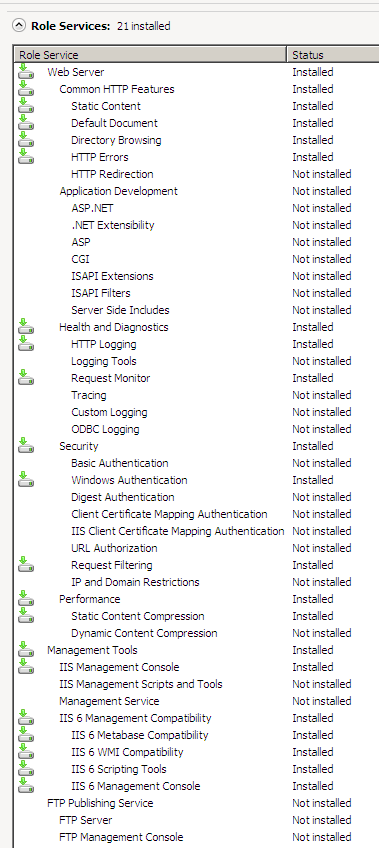
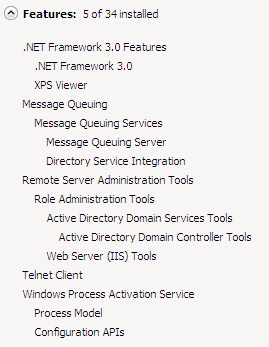
This is what your server will report as the installed roles and features after installation.
Roles
Features
I’m planning on posting these files for the other roles when I get a chance.
I apologize for the poor readability here – I’ve been working on cranking out a new blog design for quite some time and just haven’t gotten around to publishing it. It should improve on any kind of code viewing.