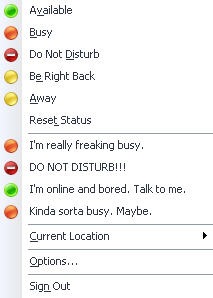
Yesterday afternoon I was tinkering with the custom states you can define within Office Communicator 2007 and found actually creating the custom states obnoxiously difficult for an end-user. In an effort to remedy that problem I whipped up an application I’m going to call the Communicator 2007 Custom Presence Tool. Let’s call it a beta version for now, just to be trendy.
It provides a GUI interface for users to select their custom availability and a status note to go along with the availability. The tool creates the XML file and updates the CustomStates registry value with the location of the XML file.
A few screenshots to demonstrate the functionality:
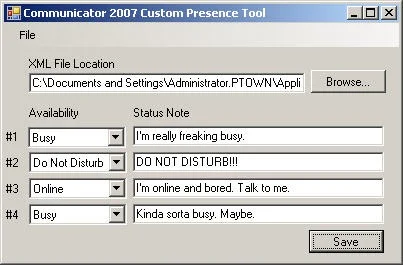
Here’s a basic rundown of what happens:
- Upon startup, the tool tries to read the value of HKCU\SOFTWARE\Policies\Communicator\CustomStates.
- If the value exists, it loads the XML file location that is specified.
- If the value doesn’t exist, the user is prompted for a location to save the XML file. It defaults to %AppData%\Microsoft\Communicator\CustomPresence.xml. I chose that location to accommodate roaming profiles.
- At this point the user is presented with a blank sheet (or filled if the XML file existed) of their custom availabilities and status notes that they can fill out.
- Once Save is pressed the registry value is updated to reflect the location of the XML file.
It seems to work fine for my purposes in a lab environment, but by no means am I a programmer so I would thoroughly test this tool out on some non-production machines before you try implementing this. I’d also love any kind of feedback, so please let me know what you think. I’m positive there are some issues I haven’t found yet so feel free to point them out.
Download Communicator 2007 Custom Presence Tool
Requirements: Microsoft .NET Framework 2.0
January 24th, 2008 at 1:16 pm
hey tom - this is pretty neat. any chance of getting the source?
January 25th, 2008 at 8:24 am
Tom,
This is a great tool. Please keep me posted if you do anything else that would be useful.
Chuck
March 5th, 2008 at 3:45 am
Great tool but doesn’t work for me. The availability led is good but the status take the default status , not the one i configured. Thanks a lot
Fred
March 10th, 2008 at 11:42 am
Hi!
Nice Tool!
I’m from Sweden, so i have to change the LCID manually, and that is boring. Also my mates donĀ“t understand, what they have to change…
So, is it possible, that you add a textbox, where i can choose my LCID value?
Thanks
April 10th, 2008 at 6:21 am
Great tool but is it only for communicator 2007? I have 2005 and it does not seem to work for me.
Also how do you change the emoticons
April 10th, 2008 at 7:22 am
No, it doesn’t work for 2005 since MOC 2005 doesn’t have that ability.
I’m unaware of any methods to add or change emoticons.
April 15th, 2008 at 7:19 am
Nice and practical. I was building the same tool when I’ve found your’s.
Note for the people running Vista: you need to run it as administrator (and I mean: right click -> run as administrator), otherwise it won’t be able to write to the registry the necessary key.
April 24th, 2008 at 6:13 pm
This is great. But why no option for “Away”? I want to put I’m out for lunch so that people will know where I am. Or will be right back soon?
Can you help?
April 26th, 2008 at 10:14 pm
Brilliant tool! I discovered the custom presence feature a while ago but grew tired of explaining how to save/edit the XML file, run the Registry hack, etc. Your solution is great!
April 28th, 2008 at 10:56 am
that rocks! It sure beats the manual changes.
April 28th, 2008 at 10:59 am
There’s unfortunately no option for “Away” simply because MSFT doesn’t support that option in the .xml file. The program is limited in the same way as the .XML file. Because you can’t manually set an away state in the .XML file, I didn’t provide the option here. You’ll have to take it up with MSFT.
June 6th, 2008 at 9:28 am
Thanks, the deployment guide was a pain to work with. A tool like this would be nice for the Microsoft RoundTable device. That is even worse as far as user interfaces. You can only upload the xml config file via a command promt. Sheesh..
July 16th, 2008 at 7:51 am
Thank you for this tool.
Just what the end user needs, something simple!
Please keep us posted of any new developments on it or other cool things in Communicator.
Pity there is no custom Away option, that would be handy.
Paul
July 17th, 2008 at 4:18 am
Hi Tom, great job! I’m trying to automatize the status of the users when they initialize communicator, Does anybody know what is the registry key and the value that should have it for them to appear as not ready/busy instrad of available?? thanks in advance for your help
Alf
July 23rd, 2008 at 8:09 am
This is a wonderful tool, wish i would have found it sooner. I was able to this before, but had to do it manually. After a reload, i have not been able to set this again. I think it is because of the newer build of OC 2007.
July 28th, 2008 at 5:59 am
Yeah. New build of MOC breaks it. ;_;
July 28th, 2008 at 6:21 am
Hmm. I’ll look into fixing it for the new build next chance I get.
July 28th, 2008 at 8:03 am
Problem is here: http://support.microsoft.com/?kbid=951662
Fix is here: Change EnableSIPHighSecurityMode to 0.
July 31st, 2008 at 7:30 pm
Love it! Thanks….. now all I need is emoticons
August 14th, 2008 at 10:53 pm
Hi, this is working excellent. Now I am looking for an feature to hide contacts which are OFFLINE in my groups automatically. What do you think? Could be worthful. BR Chris
August 21st, 2008 at 3:46 am
I can see my custom status, but in the Communicator itself all my collegues still just see me as Away or Available. How can they check my custom status?
August 27th, 2008 at 4:36 am
Hi,
it is nice, but regrettably the Status Note is not to be seen on a Communicator, where language German is configured,for example. What could be the reason for that?
BR Axel
August 27th, 2008 at 7:30 am
Axel, the XML file generated by the tool is hardcoded to use 1033 as the LCID, which is English. If you manually open the XML and replace the LCID with the German value, which I believe is 1031, you should be able to see the states in MOC. I’ll try and use some logic in the next version to detect the OS language and use that value in the future.
September 1st, 2008 at 3:41 am
Hi Tom, this works. I’m not familiar with XML: is it possible to insert a second entry for the other language in the XML file manually, so that the communicator can use the necessary entry, whether he needs german or english? I think, that would help.
September 22nd, 2008 at 11:56 am
Nice work Tom! I guess now I can set my status to busy with a little explanation to say I am really busy… kinda
October 17th, 2008 at 2:26 am
I was not able to get this to work again after my OCS upgrade. Thanx to these comment I found the solution I was looking for. The fix from Alan works perfectly.
Might be nice as an option in the GUI to check for this value and offer the user to change it.
October 17th, 2008 at 7:54 am
Great tool. Better that doing it manually. But having a problem. It creates the XML file just fine but DOES NOT update the registry even running it as Administartor. Any help would be nice. Thanks
November 7th, 2008 at 5:34 am
Nice Article and Tool. Is there any chance of publishing the source code?